Your First Inference Request
Takes a developer from zero to a first working API call to Nebius Token Factory, then teaches them to read and change the response.
Live · tested in SCORM Cloud · developer-reviewedHi, I’m Mariia Mukhina.
E-learning courses, storyboards and blended programmes for adults at work. Grounded in learning science, built on real data and reviewed by subject-matter experts.

I check whether training is the right fix before I build anything.
Observable objectives first, then checks that measure them.
Rise 360, HeyGen, Supademo, Figma and hand-built HTML.
LMS test runs, accessibility checks, reviews by engineers.
Five projects: three on AI and developer tools, two on preparing frontline staff. Each one opens in the browser, no sign-up needed.
Takes a developer from zero to a first working API call to Nebius Token Factory, then teaches them to read and change the response.
Live · tested in SCORM Cloud · developer-reviewedA 4-minute interactive lesson on using an AI tool to write commit messages, and checking what it gets wrong.
Live · in expert review
Five short days that turn one-line requests into prompts people can reuse at work, and teach them to check the answer. Built on 4C/ID.
Live · all 5 days builtA blended onboarding programme for retail associates: needs analysis, objectives, a 14-day journey, an evaluation plan and a one-page buddy guide.
Concept project · ready for pilotA competency map and certification path for new technicians working near high-voltage systems: 18 competencies, 9 safety-critical gates and a mentor checklist.
Concept project · ready for SME reviewThis is how I worked on all three projects. I start by using the product myself and finish by checking that the course actually works.
I go through onboarding myself and write down every place I get stuck.
Found: the quickstart model was Dedicated-only, so new users' first call failed.
One sentence on who they are, what they can already do, and what they get wrong today.
"Knows Python and the terminal, has never called an LLM through an API."
What the learner can do at the end, as observable actions. Then the assessment. Then the content.
Create a key · send a request · read the response · change it.
A procedure, a judgement skill and a habit need different designs. I pick the model to match.
Prompting is a judgement skill, so AI Prompting Essentials uses 4C/ID.
Every lesson gets one goal and one learner action on a single page before I open Rise.
A lesson with no action of its own gets merged.
Model names from the live catalog, code I ran, outputs I generated. No invented examples.
11 real ChatGPT outputs power the "Fix the prompt" interaction.
Video for the "why", click-through demos for the "how", interaction for practice.
HeyGen · Supademo · Figma · Rise · custom HTML.
Captions, keyboard use, colour never alone, mobile. Then an LMS test run.
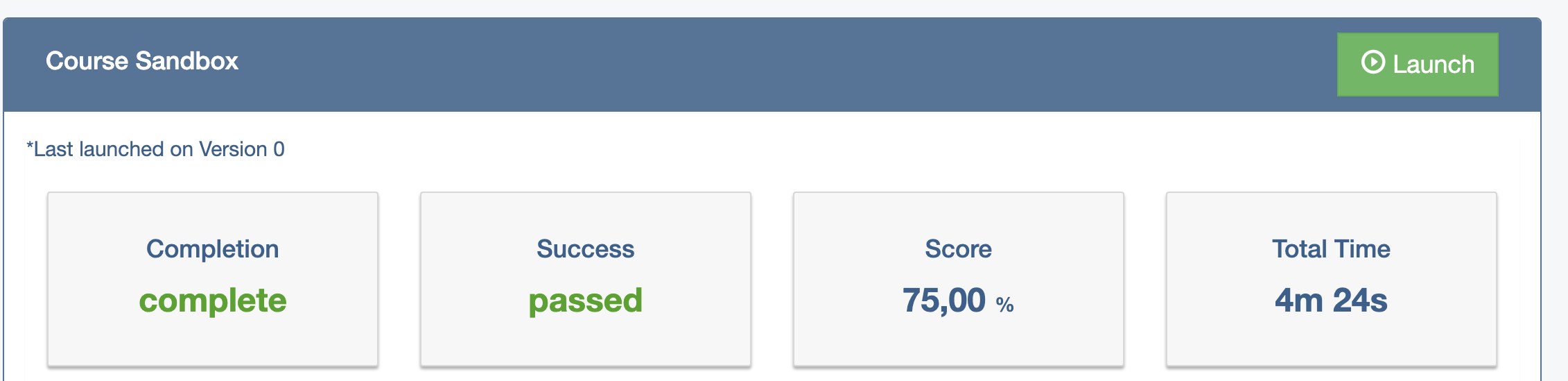
SCORM Cloud: complete, passed, 75%.
An engineer checks technical accuracy; a small pilot shows where learners struggle.
Feedback that isn't confirmed on screen gets rewritten.
A short designer's note closes each project: who it's for, what I chose, what I'd do next.
| Model | What it means in practice | Used in |
|---|---|---|
| Merrill's First Principles | Start from a real task; demonstrate, then let learners apply | API course · Commit storyboard |
| 4C/ID | Whole tasks from simple to complex, with support that fades | AI Prompting Essentials |
| Mayer's multimedia principles | Pre-training, no redundant narration, nothing extra on screen | All three |
| Cognitive Load Theory | Few new terms before the first action; worked examples for novices | All three |
| Backward design + Bloom | Observable objectives first, assessment aligned to them | All three |
| Kirkpatrick + xAPI | Measure learning and behaviour, not only completion | API course · AI Prompting Essentials |
I use AI assistants to draft faster and to get a second reviewer. Decisions about audience, objectives, structure and what to cut are mine. I check every fact against the live product and run every piece of code myself.
Job aids, storyboard frames and covers I designed for these projects. One visual system across video, course and print. Click any image to see it full size.
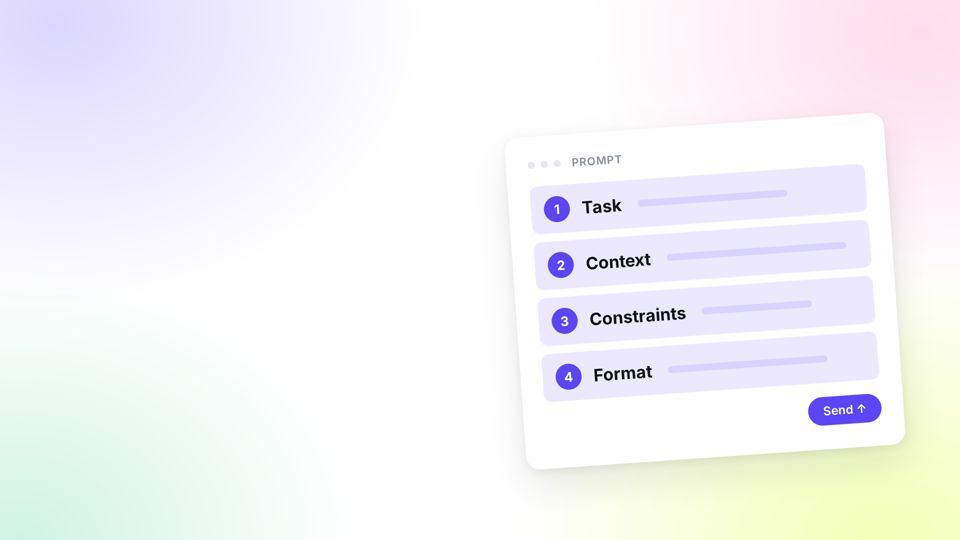
One printable A4 page: the four prompt elements with examples, what's safe to paste, and one habit before sending.
Numbered segments link each part of the prompt to its label, so colour is never the only cue.
Two versions: one without text for the course platform, one with the title for the portfolio.
Three layouts (Full, Bubble, Split) on one 1920×1080 grid, with fixed card sizes and captions. The presenter is my AI avatar, disclosed to learners.
What happens between sending a request and getting an answer, in four steps, next to the real SDK call.
Stage, generate, read, adjust. VS Code mockups on the Dark+ palette, so they read as the real editor.
Shows what the tool can't do: it describes a bundled commit but can't split it.
A teaching-methodology degree, eight years of designing learning, and recent training focused on AI and technical content.
A 20-minute course that takes a Python developer from no API key to a working request to Nebius Token Factory, and teaches them to read and change the response.
I signed up for Token Factory and followed the official quickstart, noting every place I got stuck. Three findings shaped the course:
A backend developer asked to add a language model to a product. Comfortable with Python and the terminal; new to API keys, tokens, temperature and finish_reason. Explaining what a terminal is would sound condescending.
The course is for developers who want to use a model through Token Factory, not run one on Nebius AI Cloud. Lesson 1 says so, and points the second group elsewhere.
| Objective | The learner can… | Lesson |
|---|---|---|
| Create | Create an API key and keep it in an environment variable, not in the code | 2 |
| Send | Send a chat-completion request to Token Factory from Python | 4 |
| Read | Find the generated text, why generation stopped, and how many tokens it used | 5 |
| Change | Change the model and the temperature, and predict what each change does | 6 |
Lesson titles repeat the four verbs, and the final quiz has one question per objective, each in a new situation rather than a repeat of a lesson check.
Merrill's First Principles put one real task at the centre: get a first answer from the model. Carroll's minimalism, written for teaching software, says people learn by doing and by recovering from errors, so the course gets to code fast and treats errors as content. Mayer's pre-training sets a hard cap: five new terms before the code, everything else when it's needed.
API_KEY, which would have failed.Qwen/Qwen3-30B-A3B-Instruct-2507, marked Public, fast and cheap. An Instruct model rather than a reasoning one, so temperature visibly changes the answer in lesson 6.finish_reason: "stop", 60 tokens.OPENAI_API_KEY, and beginners think they need an OpenAI key. The error block in lesson 4 explains this.A Supademo walkthrough of creating a key in the real console, an animated diagram of the request pipeline, code in Rise code blocks so indentation survives copying, and no narration: developers skim and copy code, and a voice reading on-screen text adds load without adding meaning.
Completion is based on the final quiz, pass mark 75%, reported as passed or failed so the LMS shows whether the objectives were met, not just whether the course was scrolled through. Rise doesn't send in-lesson knowledge checks to the LMS, so all metrics are built on the final quiz.
The web version on GitHub Pages runs without an LMS, so anyone can take it. The xAPI package is available to download above.
I uploaded the xAPI package to SCORM Cloud and took the course as a learner, with one deliberate wrong answer:

The course was reviewed by Igor Borovik, Python Developer, and Aleksandr Kolesnikov, Modern Workplace Engineer and Infrastructure Team Lead at Nebius. Their comments led to four changes:
openai library: it saves writing HTTP requests by hand.messages as a chat that the model completes, not a single question.system, user and assistant, are explained, with a check on where rules for the whole chat belong.In the course: completion, quiz pass rate and the questions failed most. In the product: the share of new accounts that make a first successful API call, and how fast. In support: fewer tickets about keys, base URLs and unavailable models. The product metric matters most, because the course exists to get people using the platform.
Key and request come early. Projects, IAM and quotas wait for a later module, once the learner has a reason to care.
Only API key, base URL, model ID, token and temperature before the code.
The five most likely first errors sit in the lesson, exactly as the learner sees them.
Model names, URLs and responses come from the live product, which is how the quickstart problem was found.
A storyboard for a 4-minute interactive lesson: juniors learn to use an AI tool that writes commit messages, and to catch what it gets wrong.
Junior developers write commit messages like "fix", "wip" or "stuff". An AI generator can write better ones, but juniors tend to accept whatever it suggests, including the wrong type of change. The risk isn't that they don't use the tool. It's that they trust it without reading.
A junior developer with up to two years of experience. Makes commits every day, has never been taught a message format, and has never had to find a bug through the project history.
After this lesson, a junior developer can generate a commit message with the tool, check it against the Conventional Commits format, and correct it when the tool gets it wrong.
Merrill's principles start from a real problem, then demonstrate, then let the learner apply. That fits a short lesson where motivation has to come first: juniors won't care about a format until they feel what bad messages cost them.
| Principle | Screen | What the learner does |
|---|---|---|
| Problem | 1 · Find it | Tries to find the commit that broke payments in a history of "fix" and "wip". Can't. Then finds it in two seconds when the messages are clear. |
| Demonstration | 2 · The rule | Sees one message split into type, scope and description |
| Demonstration | 3 · The tool | Watches the tool propose a message, and a developer fix its wrong scope. Sees what the tool can't do. |
| Application | 4 · Choose | Picks the best of three generated messages |
| Application | 5 · Fix | Finds the wrong part of a message and corrects it, unaided |
| Integration | 6 · Your code | Gets a reference card and one habit to take to the next commit |
Support fades across screens 4 and 5: recognise → choose → fix. Every screen uses a fresh example, so no answer is shown before it's asked for. Learners act for 140 of the 240 seconds.
The lesson is narrated, so the script carries most of the meaning, and a script is what a reviewer can check line by line. Every screen uses the same rows in the same order: narration, on screen, learner action, feedback, technical notes. I only mocked up the parts where layout is part of the learning: the commit log, the editor and the message parts.
Colour is never the only signal: message parts are numbered as well as coloured. Everything works by keyboard. Narration is captioned, and the lesson works with sound off. Code is real text, not images.
Storyline 360 rather than Rise, because screens 1 and 5 need state changes and a two-step interaction that Rise blocks can't handle cleanly. Estimated build: 6–8 hours plus narration. The VS Code sequence on screen 3 is the only custom animation. The product is named only twice: in the demo and on the last screen.
Before building, I'd confirm what I had to assume: where the Generate button really is in VS Code, IntelliJ and the web app; whether the tool offers one draft or several; whether it can learn a project's own scopes; and which links and tracking the last screen should use.
Alexandr Tsaplin, Software Engineer at Pinely, reviewed the storyboard for technical accuracy and clarity. Two changes came out of it:
A second developer review is in progress, including the answers experts might disagree on, such as whether raising a limit is a feat.
First-try accuracy on screen 5, recorded as a SCORM interaction, and install clicks from UTM-tagged links on the last screen. For a four-minute lesson SCORM is enough; xAPI would add setup without adding data we need. If most get screen 5 wrong, screen 3 needs a clearer demonstration of checking.
The learner can't find the bug in a bad history. The standard arrives as the answer to a problem they just felt.
The demo includes its mistake and a card on what it can't do. Learners trust a tool more when the lesson is honest about its limits.
The hardest screen, fixing a message, is the longest one. The demo is short.
Where the brief didn't say how the tool works, the storyboard lists the question for the product team instead of inventing an answer.
A five-day course that takes office professionals from one-line requests to prompts they can reuse at work, and teaches them when not to trust the answer.
People already use AI assistants at work. Sometimes the answer is great; more often it's generic, too long or slightly wrong, and they rewrite it by hand. Nobody taught them how to ask, or how to check.
Anna, 34, project coordinator. Uses an AI assistant a few times a week to draft emails and summarise meeting notes. Has 30 minutes a day for learning, between meetings, sometimes on her phone. Doesn't need the theory behind language models.
| Today | After the course |
|---|---|
| One-line requests, then manual rewriting | Structured prompts that produce usable first drafts |
| Accepts or rejects the first answer | Diagnoses what's missing and refines |
| Unsure when the output can be trusted | Checks facts, numbers and sources before using it |
| Pastes whatever is at hand, including sensitive data | Knows what must never go into a prompt |
Partly. A job aid can hold the checklist, but the core skill, deciding what the model needs to know for this task, is a judgement that changes every time. That can only be built through practice on varied, whole tasks. So the course is built around practice, with the job aid as support.
Eight observable objectives, written as action, condition and criterion. None starts with "understand". Each one is practised in a task and measured in a check or in the capstone.
| Day | The learner can… | Bloom |
|---|---|---|
| 1 | Spot which of the four elements (task, context, constraints, format) a prompt is missing, in 4 of 5 cases | Analyse |
| 1 | Rewrite a one-line request into a prompt that produces a usable first draft | Apply |
| 2 | Add labelled material (text, file, image) and examples so the output matches a required style | Apply |
| 3 | Diagnose why an answer misses and choose the right fix | Analyse |
| 3 | Check an answer for invented facts and biased wording before using it | Evaluate |
| 4 | Split a complex task into a chain of prompts and ask for tables and checklists | Apply |
| All | Sort information into safe, remove first, never, with no errors on "never" | Apply |
| 5 | Build and test a reusable prompt template for a recurring task | Create |
Prompting looks simple, but it's a judgement skill: there is no single correct prompt. Courses that teach it as a list of tips produce people who can recite the tips and still write weak prompts. 4C/ID was built for complex skills like this. It puts whole, realistic tasks at the centre, orders them from simple to complex, and withdraws support as competence grows.
| 4C/ID component | In this course |
|---|---|
| Learning tasks | One task class per day, from a single clear request to the learner's own recurring task |
| Supportive information | A short presenter video each day: why the model answers the way it does |
| Procedural information | Prompt anatomy, the chain pattern, a template: given exactly when needed |
| Part-task practice | Quick drills: spot the missing element, name the cause, pick the shape, safe to paste |
Inside each day, support fades: worked example → completion task → real task in the learner's own AI assistant. The next day starts a harder task class and support goes back up. Days 2–5 open with two retrieval questions on the day before.
Every AI answer in the course is real: generated in a clean chat, unedited, and labelled with the model and date. I ran 30+ prompts and built the lessons around what actually came back, including the mistakes. Those mistakes became the best teaching material:
| Medium | Used for | Why |
|---|---|---|
| Video · HeyGen | Opening each day: the "why" | A face and a voice help a mental model land. Seven videos, one presenter: an AI avatar of me, disclosed to learners |
| Audio · ElevenLabs | Two procedural lessons | Optional, next to the same text. Nothing to show on screen, so a video would add nothing |
| Interactions | All practice | Fix-the-prompt builder, spot-the-wrong-row, click the sentence that needs fixing, order the chain, drills |
All videos follow one style system: a 1920×1080 grid, three layouts (Full, Bubble, Split), fixed card sizes and one palette, documented so any video can be updated without redesign.
Captions in every video and a transcript below it. Every interaction works by keyboard and click. Colour is never the only signal. Plain English for non-native speakers. Tested at phone width.
The whole course is built as a working HTML prototype and published on GitHub Pages, so anyone can take it without an account. The production target is Rise 360 with embedded Storyline blocks, reporting completion, quiz score and capstone result to the LMS through xAPI.
Self-paced by design: one day at a time, 30–40 minutes, spaced over a week.
| Kirkpatrick level | Measure |
|---|---|
| 1 · Reaction | Three-question pulse at the end of each day |
| 2 · Learning | Final check score; capstone criteria |
| 3 · Behaviour | Survey after 30 days: do they still use their template, how much do they rewrite AI output |
| 4 · Results | Agreed with the stakeholder before launch, e.g. time saved on recurring writing tasks |
After the first 100 learners, the data triggers changes: any question fewer than 40% get right is reviewed for ambiguity; any day with more than 20% drop-off is reviewed for length.
A live model inside the course would make feedback impossible to write. Real, dated outputs keep every feedback line true to what the learner sees.
Every worked example includes something the model got wrong. The course teaches checking by showing why it's needed.
"Safe to paste?" is a daily item and a criterion the capstone can't pass without.
Video opens each day. Procedures are text or optional audio, so learners can follow them at their own pace.